


Stock Screener, AI Scanner
4.3582.00 Reviews
App Specs
- Version
- 5.1.1.0
- Updated On
- License
- Free
- Downloads
- 1,000,000+
- Developer
- AInvest Fintech, Inc.
- Categories
- Finance
- Platform
- Android
Screenshots
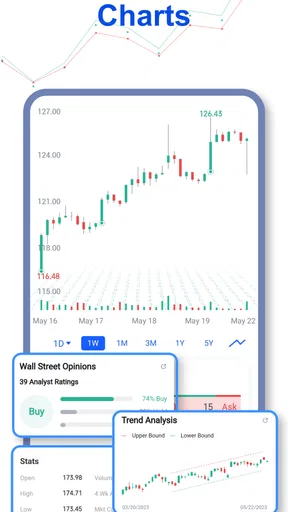
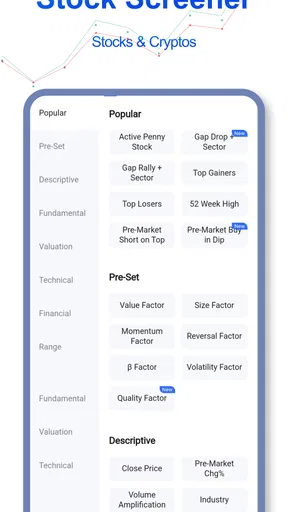
 Analysis by AppCompare
I see Stock Screener, AI Scanner as a research companion, not a shortcut to picking winning shares. Its value is in helping me narrow a broad market into a smaller group worth examining, then giving me a place to follow stocks, charts, and related news. That can make an early research session feel more manageable, especially if I already have questions in mind. The important distinction is that a scanner can surface candidates; it cannot decide whether a company suits my goals, finances, or tolerance for risk.
That makes the app most useful when I treat its suggestions as prompts for further reading rather than instructions to trade. I would not open it expecting a guaranteed signal or a substitute for a financial plan. For people who enjoy exploring stocks but find it tiring to search one company at a time, it offers a more focused starting point. For anyone who wants a simple place to buy and hold investments without actively researching them, a conventional brokerage app may be a better fit.
A research tool, not a trading thesis
The core idea is straightforward: use screening and AI-assisted discovery to help identify stocks, then inspect the information around them. That combination can be helpful because finding a ticker is only the beginning. A stock that appears interesting in a scan still deserves a closer look at its chart, the news affecting it, and the reasons it matches the screen in the first place.
I find the best mindset is to decide what I am trying to learn before I run a search. Am I looking for companies with a certain profile, checking what has moved recently, or building a list to review later? A clear question makes the results easier to interpret. Without one, a long set of candidates can feel productive while leaving me no closer to a sensible decision.
That distinction also helps set expectations around AI. Pattern recognition can draw attention to combinations I might otherwise overlook, but a pattern is not a promise about what happens next. Market context changes, and a result that looks compelling on screen may have a perfectly ordinary explanation once I read the surrounding news. I would use the scanner to widen my view, then apply my own judgement before acting.
First Impressions
Downloading the Stock Screener, AI Scanner app was a breeze. It’s available on both Android and iOS, which is always a plus. The interface is sleek and modern, with a user-friendly design that makes navigation straightforward. I didn’t need a PhD in finance to understand how to use it, which is a huge relief because, let’s be real, some of these finance apps can get a bit too technical.
Upon launching the app, you’re greeted with a dashboard that’s both informative and not overwhelming. It’s a fine balance, and the developers seem to have nailed it. All the key features are just a tap or two away, and the layout is intuitive enough that I didn’t find myself getting lost or frustrated.
Worth Reading Before You Choose

EA SPORTS FC Mobile 26 Is a Bigger Football Game, but It Takes Time

Flipboard Shows What News Apps Must Do Beyond the Feed

Switching to Android Auto Means Rethinking Your Driving Routine

Google Calendar Makes a Crowded Week Easier to Manage

Ludo King Makes the Most of the Minutes Between Plans

Baby Panda World Brings Quick Play to Modern Phones, but Its Game Library Feels Busy
Stock Screener, AI Scanner is a free finance app from AInvest Fintech, Inc., and its appeal is easy to understand: it brings stock discovery, charts, and market news into one research-focused experience. It has an average rating of 4.3 from around 3.9 thousand ratings, with more than a million installs. The app is rated for everyone, though that age label should not be confused with the risk of investing, which can be substantial for adults and beginners alike.
It was released on April 30, 2020, and version 5.0.2.1 is listed for devices running Android 8.0 or later. The app is free to install, while in-app purchases range from $1.99 to $699.99 per item. I would check the purchase details carefully before committing to anything: a free starting point does not mean every available option is free, and paid features only make sense if they solve a real problem in your own research routine.
Features That Stand Out
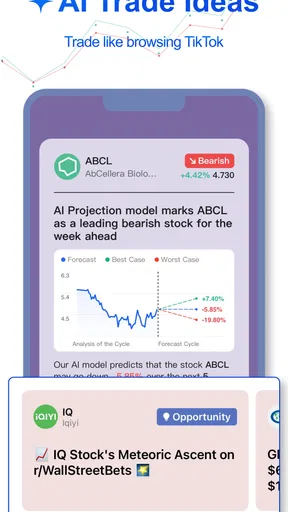
What sets this app apart from the others? Well, it’s all about the AI. The AI Scanner is designed to sift through mountains of data to find patterns and trends that might slip under the radar for the average human trader.
One feature I particularly appreciated is the customizable filters. You can tailor the scanner to match specific criteria that fit your trading strategy. Whether you're a conservative investor or someone who likes to take a few more risks, there’s something in there for you. It’s like having a personal assistant who knows exactly what you’re looking for.
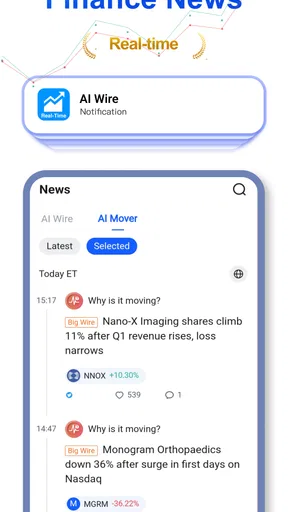
The app also offers real-time alerts and notifications, so you won’t miss out on any critical market moves. It’s a bit like having that friend who’s always in the know and texts you the minute something big happens – super handy if you’re juggling a busy schedule but still want to stay on top of your investments.
Turning a scan into a useful shortlist
Filters work best when I use them to test a narrow idea, not when I pile on every condition that sounds sensible. If I set too many restrictions, I may screen out companies for reasons that do not matter to my actual question. If I set too few, the results can become a noisy list that takes longer to inspect than a manual search. I would start with one or two meaningful criteria, see what turns up, and adjust only when I understand why the list is too broad or too restrictive.
A practical routine is to save the names that genuinely merit a second look, then review them separately rather than treating the first scan as a final selection. When a candidate appears, I would ask what the filter is revealing, what it leaves out, and whether the chart and news tell a consistent story. This is a small but important trade-off: screening saves time on discovery, but it does not remove the work of checking context.
For example, imagine I have a few minutes between errands and want to see whether anything deserves attention later. I can use a scan to create a short research queue, glance at the relevant chart or news, and leave the actual decision for a calmer moment. That is a better use of alerts than reacting to every notification while distracted. A prompt is useful; urgency is not proof that a trade is wise.
Getting the Most Out of It
To really harness the power of the AI Scanner, I found it helpful to spend a little time adjusting the settings to my preferences. The app offers tutorials and guides to help you get started, so don’t worry if you’re not sure where to begin.
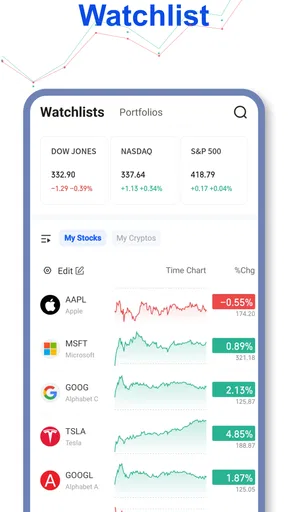
There’s also a community feature where you can connect with other traders. It’s a bit like a social network for stock enthusiasts, and you can share tips and strategies. I found it quite useful to bounce ideas off fellow users and get insights I might not have considered.
One thing to keep in mind is that while the AI is powerful, it’s not infallible. It’s a tool to aid your decision-making, so it’s essential to do your own research and not rely solely on the app’s suggestions. Think of it as an extra set of eyes, rather than a fortune teller.
Where the convenience has limits
The main risk is not that a scanner exists; it is that a polished shortlist can feel more authoritative than it deserves. A filter can make a stock easier to notice, but it cannot tell me whether a sudden move is temporary, whether a headline changes the investment case, or whether the price already reflects the news. I still need to check the underlying story and think about how a holding would fit alongside what I already own.
Alerts also require restraint. They are handy for bringing a development to my attention, but constant interruptions can encourage rushed decisions or make ordinary market movement feel like a call to action. I would keep notifications useful by choosing only the ones I genuinely plan to act on as research prompts. If I find myself checking every alert immediately, turning some off may improve my process more than adding another filter.
The community can broaden the range of ideas I encounter, but social confidence is not evidence. I would read other users’ views as viewpoints to investigate, not as validated advice. That is especially important when a post makes a strong claim without explaining its reasoning. The feature may help me discover a question worth researching; it should not replace independent checks or professional advice when I need it.
Why You Might Love It
If you’re someone who’s keen on staying ahead of the curve, this app could be a game-changer. The ability to scan through data quickly and efficiently can give you an edge, especially in today’s fast-paced market environment.
The app’s design makes it accessible for both newbies and seasoned traders alike. Whether you’re just starting out or have been trading for years, the features are adaptable to suit various levels of expertise and interest.
Who should make room for it
I would recommend it most to curious self-directed investors who want a discovery tool alongside their main investing setup. It can also suit someone learning how stock screens work, provided they are willing to question the results and read beyond the headline. The combination of filters, charts, news, and AI-assisted scanning gives that kind of user several ways to move from a broad idea to a more focused research task.
It is less suitable for someone who wants a hands-off portfolio, a guaranteed buy signal, or a platform whose main job is placing and managing trades. In those cases, a diversified investing service, a broker built around order execution, or a basic financial news source may be more appropriate. I would also skip the paid options unless I can name the specific research bottleneck they solve; paying more is not the same as making better decisions.
Compared with searching tickers manually across separate charting and news tools, this app’s strength is convenience and discovery in one place. A dedicated charting service may still offer a better experience for someone whose work depends on detailed technical analysis, while a brokerage is the more natural choice for managing transactions and holdings. I see the scanner as a useful layer in a broader toolkit, rather than a replacement for every finance app.
Final Thoughts
After spending some quality time with the Stock Screener, AI Scanner app, it’s clear that it’s more than just another tool in the vast array of stock market apps. Its AI capabilities are impressive, and the user-friendly design makes it accessible to a wide range of users.
It’s a bit like having a really smart friend who’s always ready with the latest stock tips and advice, without the need for constant coffee runs. If you’re looking to enhance your trading game with a bit of tech-savvy assistance, giving this app a whirl might just be worth your while.
So, if you’re curious to see how it could work for you, I’d say go ahead and download it. After all, the stock market waits for no one, and having a little AI on your side might be just what you need to stay ahead.
My bottom line
I would try it if I wanted a more organized way to discover stocks and follow up with charts and news, while keeping my broker and personal research process in charge of any decisions. Its biggest strength is reducing the effort involved in finding ideas; its biggest caution is the temptation to mistake a surfaced pattern for a sound investment case.
Used patiently, it can help turn a vague market check into a defined research session: set a sensible screen, inspect a few candidates, and decide what deserves more attention later. Used impulsively, it can add noise and encourage reaction. That difference comes down less to the AI than to how deliberately I use it, which is why I recommend it as a practical research aid rather than a reason to trade.
Pros
- User-friendly interface for quick navigation.
- Real-time data updates enhance decision-making.
- Customizable alerts for stock price changes.
- Advanced AI tools for predictive analysis.
- Comprehensive financial news integration.
Cons
- Limited features in the free version.
- Occasional lags during high traffic times.
- Some features require a steep learning curve.
- Limited support for smaller stock markets.
- In-app purchases can be pricey.
FAQs for Stock Screener, AI Scanner
What features does the Stock Screener, AI Scanner app offer?
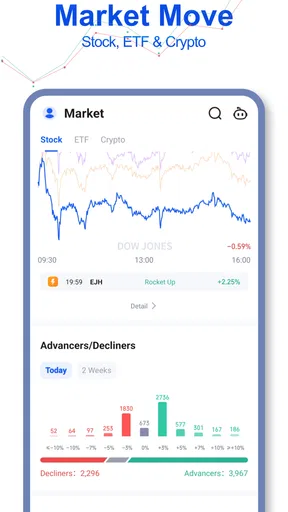
The Stock Screener, AI Scanner app provides real-time stock analysis, AI-driven insights, customizable screening options, and detailed market trends. Users can tailor their search parameters to find specific stocks that meet their investment criteria, making it a powerful tool for both novice and experienced investors.
Is the Stock Screener, AI Scanner app suitable for beginners?
Yes, the app is designed with user-friendly interfaces and includes tutorials for beginners. It simplifies complex data and offers educational resources, making it accessible for those new to stock trading while still providing advanced features for seasoned investors.
Are there any subscription fees for using the Stock Screener, AI Scanner?
The app offers both free and premium versions. The free version includes basic features, while the premium subscription unlocks advanced screening tools, AI analytics, and ad-free usage. Pricing details are available on the app store's download page, allowing users to choose according to their needs.
How does the AI feature enhance stock screening in the app?
The AI feature analyzes vast amounts of market data to provide predictive insights and trend analyses. It helps users identify potential investment opportunities by highlighting patterns and anomalies that might not be apparent through manual screening, thus aiding in more informed decision-making.
What platforms is the Stock Screener, AI Scanner app available on?
The app is available for both Android and iOS devices. It can be downloaded from the Google Play Store and the Apple App Store, ensuring compatibility with a wide range of smartphones and tablets. Regular updates ensure it stays optimized for new devices and operating system versions.


